Creating user interfaces has always followed the same logic: designers create and define the screens, and developers code and implement that design so that users experience those screens exactly as they were defined.
The arrival of AI is revolutionizing the sector, and we are already seeing new approaches that could change this way of working, or even transform webs and applications as we currently know them.
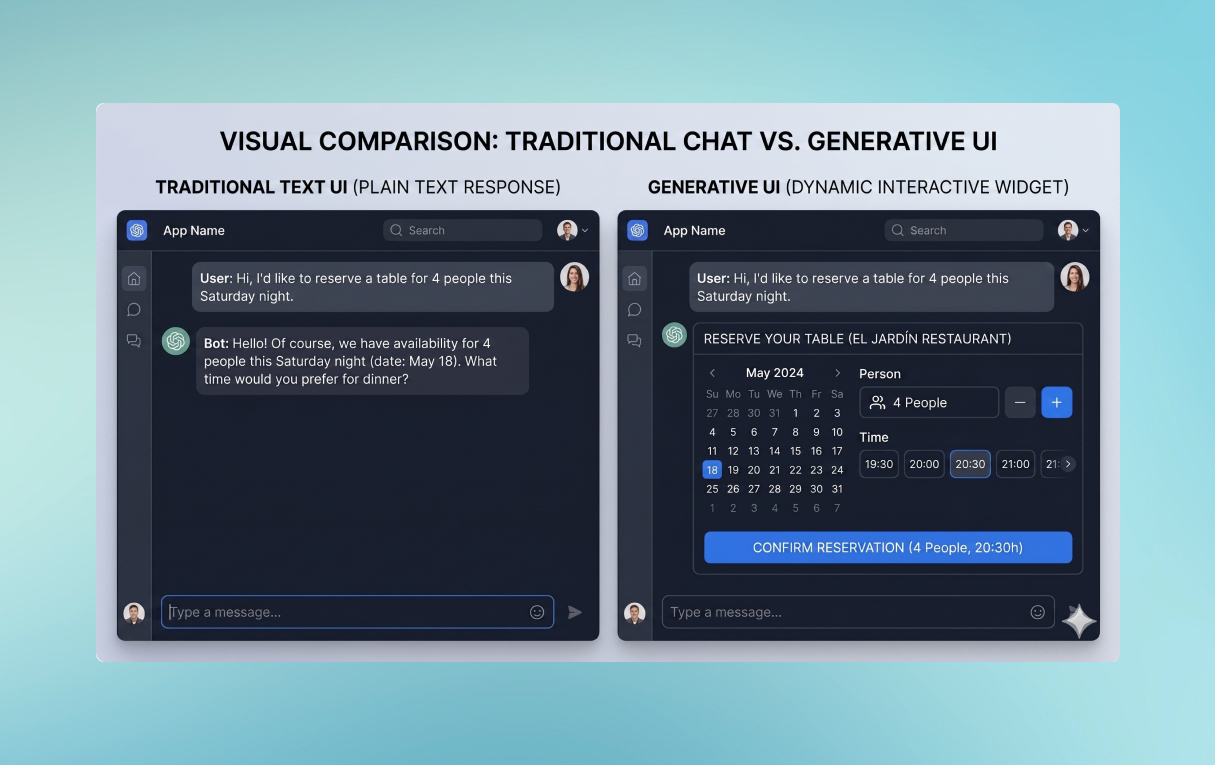
An emerging proposal is Generative UI (GenUI), where artificial intelligence transitions from being a helpful chat assistant to directly integrating into a website or application, responding to the user by generating an interactive interface tailored to the user’s specific need at that exact moment.
In this article, we will look at what Generative UI is, how it works at a technical level, its current pros and cons, and the available approaches to implement it—including the emerging A2UI protocol.
What is Generative UI?
Generative UI is a pattern where an artificial intelligence model—(LLM)—produces a structured interface description: controls, elements, forms, lists, calls to action, confirmation steps… and the client renders them using native, real, and controlled components.
It is not about “building a frontend with AI” or generating random HTML code on the server. The key is that the AI orchestrates the composition of pre-existing, audited components, adapting the interface to the context, the user’s intent, and the system’s state.
This becomes especially valuable when:
- The system needs to request information that is not known beforehand (variable fields based on context).
- The flow depends on the previous state, policies, inventory, or availability in real time.
- The result must be actionable: booking, approving, paying, generating a document, opening a ticket…
The difference is concrete. Compare it to a classic text response:
- AI with text: “Tell me how many people you want, what date, and at what time.”
- AI with Generative UI: it directly renders a date and time picker, a number of people input field, and a “Check availability” button—all linked to the context and ready to act.
The leap is not just aesthetic. It is a paradigm shift that transforms chat into actions within the web.
The evolution of UI: from static to generative
To understand this shift, we can review how interface design has evolved over time:
- Static UI: fixed screens, manual updates, predefined layouts that look the same for all users.
- Responsive UI: adaptation to screen size, but without adaptation to the user or context.
- Adaptive UI (rule-based personalization): segmentation, A/B testing, business rules. Greater relevance, but still reactive and manual.
- Generative UI: the AI builds the optimal interface in real time, anticipating user intent and adapting it to the context without manual intervention.
How Generative UI works under the hood
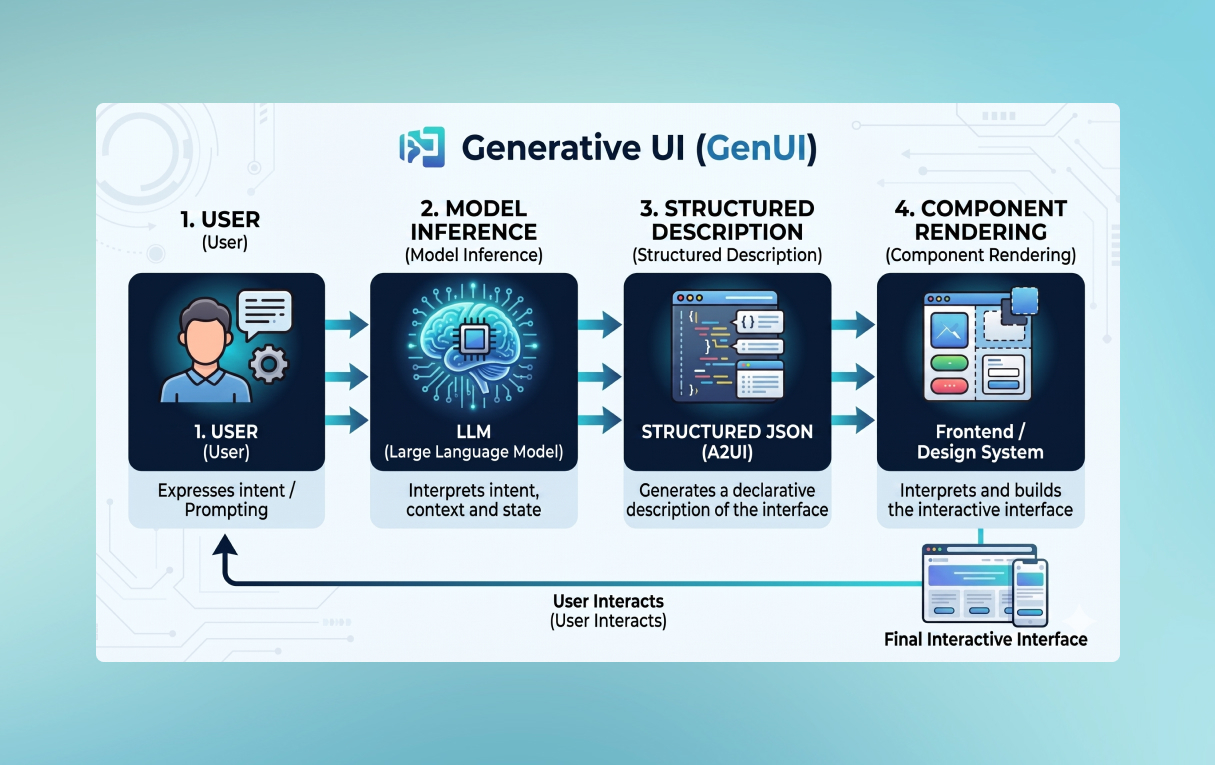
At a high level, the Generative UI flow has four steps:
- Intent capture: the user expresses what they need.
- Model inference: an LLM interprets the intent, context, and system state, generating a structured description of the interface that should be displayed.
- Client rendering: the frontend interprets that description and builds the UI using real components from the design system.
- Interaction: the user interacts with the UI.
Two approaches to implementing Generative UI
In practice, there are two major strategies for testing GenUI:
Approach 1: Custom GenUI
This approach consists of forcing the model to return JSON in the format you need based on a schema defined by the team, which is then manually rendered on the client.
Advantages:
- Very fast for prototypes.
- Maximum freedom to design your own UI “language”.
- Easy to implement with any modern framework.
Limitations:
- Contract versioning: any change to the schema can break existing clients.
- Action management: normalizing user events (clicks, submits) and their payload becomes complex at scale.
- Security: without an explicit contract and a closed catalog, the model can generate unaudited components.
Approach 2: GenUI via protocol and catalog — A2UI
The emerging standard is A2UI (Agent-to-User Interface). The agent never sends executable code—it sends structured data that the client interprets using trusted components.
A2UI: the protocol standardizing Generative UI
A2UI is an open-source ecosystem composed of three layers:
- A message specification (currently stable v0.8 / actively evolving v0.9).
- Renderers per platform: Angular (
@a2ui/angular), React (@a2ui/react), Lit (@a2ui/lit), and Flutter. - A shared library (
@a2ui/web_core) that manages message processing, state, data binding, and incremental updates.
To understand A2UI, it is helpful to think of four fundamental pieces:
1. Surfaces
A surface is the UI container. The agent can create it, update it, and indicate which component acts as the root. Think of it as the “canvas” where the interface is built.
2. Components with IDs and references
Components are defined with unique identifiers and reference each other. This allows for partial updates without rebuilding the entire tree, which is crucial for efficient streaming rendering.
3. Data model and data binding
The UI state is managed in a separate data model. Inputs are bound to paths within that model (/reservation/guests, /reservation/date…). The agent can update the model directly, and the UI reacts accordingly.
4. Actions
Every user interaction triggers a named action (for example, search_availability or confirm_reservation). The client captures these actions via an action handler and sends them to the agent, closing the loop.
The agent does not send HTML or JavaScript—it sends a declarative description that the renderer interprets using audited design system components.
More information can be found in the official A2UI client setup guide.
Practical case: booking demo with Angular 21 + A2UI + OpenAI
To illustrate how all of this works in practice, we built a functional restaurant booking demo using Angular 21 with SSR, the A2UI v0.9 renderer, and OpenAI GPT-4o-mini as the language model.
The user experience flow
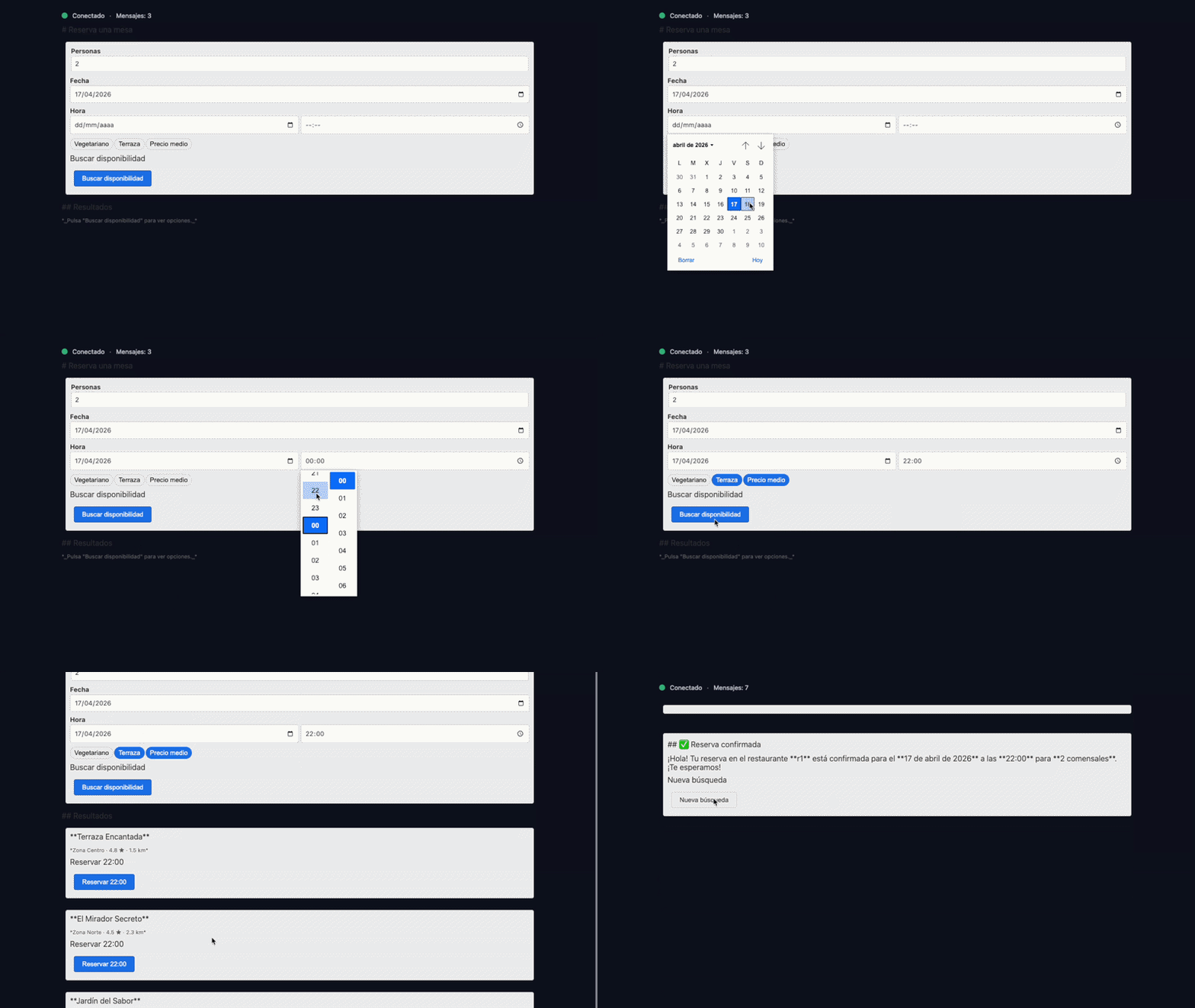 A2UI Demo
The user simply types or interacts with the interface, and the system:
- Upon connecting, the server automatically sends the search form as A2UI messages: date picker, number of people, preferences.
- The user fills out the form and clicks “Search availability”. The
search_availabilityaction is triggered. - The backend calls OpenAI with the form’s context. The model returns A2UI JSON with three available restaurants, each with its options card and booking buttons.
- The user chooses a restaurant and a time slot. The
confirm_<id>_<time>action is triggered. - The server builds the final confirmation card containing the summary, cancellation policy, and the “Confirm booking” CTA.
Why streaming improves the experience
Streaming is not an implementation detail—it is a UX differentiator. With SSE, the client receives and renders the initial form on the first “tick”, displays results as they arrive from the model, and can correct the UI incrementally if the agent decides to ask for additional information. The interface feels alive, rather than loading all at once.
In A2UI, streaming is a natural mechanism: the UI is expressed as a sequence of incremental state updates, not as a monolithic block.
Here you can see the complete example implemented with OpenAI.
Security in Generative UI
The biggest issue with GenUI: the more freedom the model has to generate the interface, the greater the risk. A2UI addresses this with explicit security principles that are worth knowing.
The four pillars of A2UI security
- No execution of generated code: the UI is declarative, it does not generate scripts. The agent cannot inject JavaScript.
- Catalog as an allowlist: the agent can only instantiate pre-approved components. If a component is not in the catalog, it cannot be rendered. Your audited design system is the security boundary.
- Actions under client control: the client decides which actions are valid and how they are processed. The server cannot execute arbitrary actions.
- Message validation: common errors such as invalid surface IDs, duplicate component IDs, wrong paths, or schema validation failures must be explicitly caught and handled.
Current cons of Generative UI in production
Generative UI is not magic—it comes with challenges that a product team must anticipate before adopting it.
Latency and performance
Generating UI dynamically requires real-time processing. Without streaming and without a “fast first paint” strategy, the user perceives the wait.
Brand consistency and design system
Without a closed catalog, the model can generate interfaces that are inconsistent with the corporate design system.
Accessibility
Dynamically generated interfaces must still comply with WCAG guidelines. Every component in the catalog must be accessible by design.
Privacy and compliance
Adaptive interfaces thrive on user context. In regulated environments (GDPR, healthcare, finance), it is essential to clearly define what data flows to the model and how it is managed.
Costs
Every interaction can trigger calls to the model. A production system needs:
- End-to-end tracing: user action → prompt → model response → A2UI messages → render.
- Metrics: latency per stage, tokens consumed, validation errors, retries.
- Cost control: models tailored per task (intent classification vs. full UI generation), output limits, and caching where applicable.
Real-world use cases of Generative UI
Perplexity AI
Perplexity is currently the clearest benchmark. It doesn’t just give you text; its Pages feature generates a complete visual structure (layout) based on your query.
Vercel (v0.dev)
Vercel has brought Generative UI into the production workflow for developers. Its v0 tool allows for generating entire React interfaces (using Tailwind and Shadcn UI) through natural language.
Conclusion: from interfaces that are designed to interfaces that are generated
Generative UI is not just another tech trend. It is a shift in the mental model of how we build and deliver digital experiences. Interfaces stop being static artifacts designed in advance and become intelligent, actionable responses to each user’s context at any given moment.
My personal opinion after trying it out is that we are in a phase that is too early; therefore, it might be ideal for testing in internal projects or B2B projects where the UX can afford to be more experimental.
We need to wait a bit longer and see how these patterns continue to evolve.