1. What Foundation Models is and how it works
2. A renewed on-device model with image support
3. More processing power with Private Cloud Compute
4. One API for different language models
5. One session, several models: dynamic profiles
6. Built-in tools: Vision and Spotlight
7. Evaluating models and prompts with data
8. From an on-device model to a common platform
9. References
Until recently, features such as turning a note —”taxi to the airport, 35 euros”— into a structured expense or summarizing a meeting in a few bullet points usually required a cloud service, an API key and usage-based costs. On top of that, the data had to leave the device to be processed.
Foundation Models, the framework Apple introduced at WWDC25, gives Swift code direct, on-device access to the language model built into Apple Intelligence. With iOS 27, the framework broadens its scope: it improves the on-device model, provides access to the Private Cloud Compute model and lets developers work with third-party models through a common API.
In this article, we review how Foundation Models works, what its main new features are and what possibilities it opens up for app development.
What Foundation Models is and how it works
Foundation Models provides access to a language model of roughly 3 billion parameters built into the operating system. Because it is already on the device, it does not increase the app’s size, it can work offline and there is no per-request cost. Local processing also keeps the data on the iPhone, iPad or Mac.
Its size, however, determines the kinds of tasks it is best suited for. Apple has optimized it for specific operations such as summarizing text, extracting information, classifying content, tagging or rephrasing a sentence. It is not designed to answer general knowledge questions or to solve complex problems.
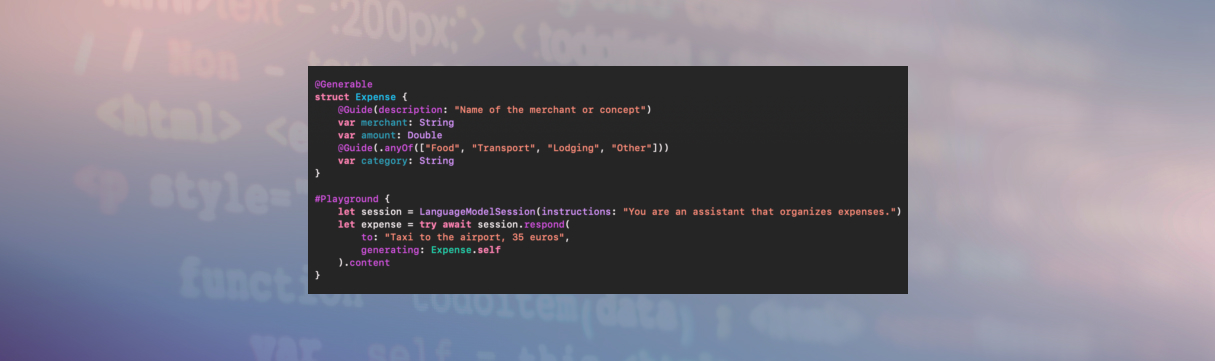
Interaction is organized around a session (LanguageModelSession), which keeps the context of the conversation. The app can define instructions that set the model’s role —for example, identifying and organizing expenses— and send it successive requests within that session.
One of its most relevant capabilities is guided generation. Instead of receiving a free-text response and having to interpret it afterwards, the app can request output with a Swift structure defined with @Generable. In an expenses app, for example, the response can include separate fields for the merchant, the amount and the category, ready to be processed by the app. This makes the information easier to handle and reduces the need to parse the generated text manually.
The framework also includes streaming, which displays the response progressively as it is generated, and tools, which let the model call the app’s functions when it needs additional information or actions. For instance, before warning users that they have exceeded their monthly budget, it could check the relevant data through a tool provided by the app itself.
Like any technology of this kind, Foundation Models has limitations. It is only available on devices that support Apple Intelligence and have it turned on, so the app must check availability and provide alternatives. In addition, safety filters may reject certain requests. In iOS 26, the available context was also limited: about 4,000 tokens for instructions, questions and answers.
A renewed on-device model with image support
One of the main new features in iOS 27 is the renewed on-device model. According to Apple, it has been rebuilt to improve response quality, instruction following and tool use. On the most recent devices, the available context grows to 8,192 tokens.
Context capacity can vary from device to device. That is why iOS 26.4 introduced ways to query the available size and count the tokens in each request, allowing the app to adapt its behavior to the hardware it runs on. That version also reduced false positives from the safety filters, an area Apple continues to improve in iOS 27.
Another notable addition is image input. The app can attach an image to the message and ask the model to interpret it. In the expenses app example, users could take a photo of a receipt to extract the merchant, the amount and the category without entering that data manually. Potential uses go further: describing images to improve accessibility, turning handwritten notes into a to-do list or suggesting recipes based on the ingredients shown in a photo.
Images can keep their original size and aspect ratio, although larger images consume more tokens and may increase response time.
More processing power with Private Cloud Compute
The on-device model is not the best choice for every task. Analyzing long documents or planning multi-step processes may require more capacity. For these cases, Apple is opening up to developers its Private Cloud Compute (PCC) model, which also powers several Apple Intelligence features.
This model offers a context of up to 32,768 tokens and reasoning capabilities. Before answering, it can work through the problem at different depth levels: a higher level can improve the response, although it may also increase waiting time.
The integration is designed to minimize the changes needed in the app. There is no need to create additional accounts, handle authentication or store API keys; switching from the on-device model to PCC may only require changing the model configuration. The rest of the capabilities, including guided generation and tool use, keep the same programming approach. Apple states that prompts are not stored and that the system’s operation can be verified by independent researchers.

PCC requires an internet connection and sets daily usage limits, which are higher for iCloud+ subscribers. In this first phase, free access is limited to developers in the App Store Small Business Program who meet the threshold set by Apple and request access. The company has announced that it will offer paid access to other developers later on. PCC also makes it possible for Foundation Models to reach Apple Watch with watchOS 27.
One API for different language models
The most far-reaching change is that Foundation Models is no longer limited to Apple’s models. The framework introduces the LanguageModel protocol, which allows different language models —local or cloud-hosted— to be connected through a common interface.
For development teams, this means that much of the code written for Apple’s model can be reused with other providers. Anthropic has released a beta package to integrate Claude, while Google offers Gemini in preview through Firebase. If a feature needs a model with more advanced capabilities, the app can add the corresponding package and pass it to the session. This flexibility also brings new considerations: third-party models may require authentication and usage-based billing. To make tracking easier, Apple adds ways to check the token consumption of responses.
Those who prefer to run models without relying on a cloud service have other alternatives. Core AI, the engine used by Apple Intelligence, makes it possible to integrate open or custom models and run them on the Neural Engine. MLX, in turn, provides access on the Mac to models available on Hugging Face. In both cases, the goal is to keep a common programming interface.
In addition, Apple is releasing the framework as open source, which allows it to be used in any environment that supports Swift, including Linux servers. The package is complemented by utilities that can be updated between system releases and that include components that are still experimental.
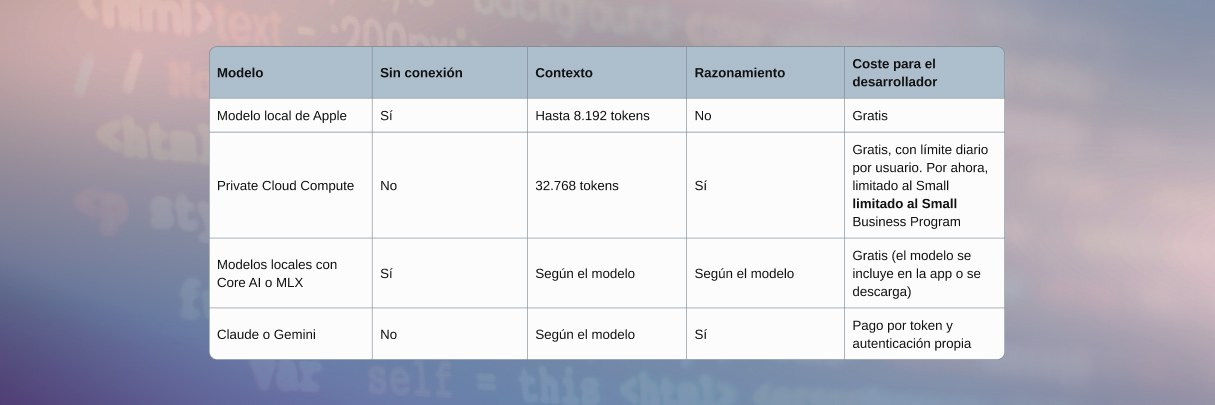
The following table summarizes the main differences between the available options:
One session, several models: dynamic profiles
Being able to choose between different models raises a design challenge: how to combine them without multiplying the complexity of the code. Until now, coordinating two models in the same feature could require creating separate sessions and manually transferring information between them. Dynamic profiles (DynamicProfile) offer a declarative alternative.
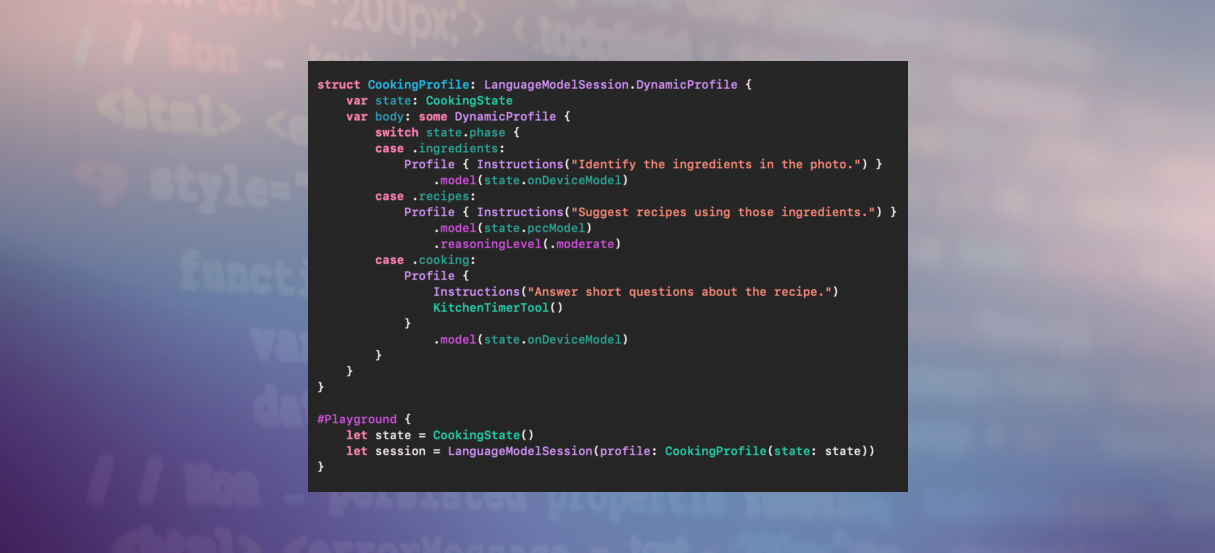
Each profile defines the model, instructions and tools the session should use in a given phase. This way, the app can switch models while keeping the context of the interaction. A cooking app illustrates the approach: first, the on-device model analyzes a photo of the available ingredients, quickly and without sending the image to the cloud. Then the session can switch to PCC to generate recipes that make better use of those ingredients and require more reasoning capacity. When the user starts cooking, the app can go back to the on-device model to answer simple questions without using up the daily PCC limit.
Each phase is configured with the model, the instructions and, where appropriate, the necessary tools. For example, the cooking phase could include a tool to start a timer.
The app can decide when to switch profiles or delegate that decision to the model itself through a dedicated tool. Apple describes two coordination patterns: one model can hand control over to another, which continues the conversation, or it can consult another model for a specific task and then use the result to build its own response.
This flexibility requires careful management of context and privacy. When switching to a model with a smaller context window, it may be necessary to summarize the history. If the next model has different privacy conditions, it may also be necessary to remove personal data before sending it the information. These transformations have a cost: the model has to process the updated history and the response may take longer.
Profiles also make it possible to centralize safety controls. When the model can take actions on the user’s behalf, Apple recommends asking for confirmation before sensitive operations, such as making a payment. Placing this control in the corresponding profile helps apply it consistently to tool calls.
Built-in tools: Vision and Spotlight
Language models are not the best solution for every visual task. Reading a QR code or recognizing very small text, for example, may require specialized tools. Foundation Models includes two tools based on Vision: a barcode reader and an optical character recognition (OCR) system that can process dense text in more than 30 languages. Once these tools are added to the session, the model can use them whenever they are needed. Given an event poster, for example, it could extract the date and venue using OCR and turn to the code reader to get the registration web address.
Another relevant integration connects the model with Spotlight. If the app indexes its content in the system search, the model can query that index and generate answers from the retrieved information. This approach is related to retrieval-augmented generation (RAG), but works with locally indexed data. In a saved-recipes app, users could ask which chickpea dishes they have cooked this month and get an answer based on their own content, without that data leaving the device.
Evaluating models and prompts with data
Although language models offer increasingly broad capabilities, their responses are not deterministic: the same request can produce different results. In addition, a change in the instructions can improve one case and make others worse without the team noticing. That is why traditional unit tests are not always enough to evaluate an AI-based feature. To address this, Apple has introduced the Evaluations framework, integrated into Xcode 27. It does not make the model always respond the same way, but it turns something unpredictable into something measurable.
The process starts from a set of examples and criteria for evaluating the responses. When the result can be checked objectively —for example, whether the amount extracted from a note matches the actual amount— the validation can be done in code.

The evaluation runs as just another Swift Testing test, although the success criterion can be expressed as a quality threshold rather than a simple pass/fail result. For example, you can require the amount to be correct in at least 90% of cases. Xcode then generates a report with the examples, the responses obtained and the reasons for each failure.For more subjective criteria, such as how useful a summary is or how appropriate a recipe is, the framework can rely on a more capable model acting as a judge. It scores each response according to the defined criteria and explains its rating. It can also generate synthetic data from a small set of real examples, which is useful when hundreds or thousands of test cases are needed. In agent-based features, the evaluation can cover not only the final answer but also the process followed: which tools were called, in what order and with what data.
Apple describes this improvement cycle as hill-climbing: changing the instructions, the model or the tools, running the evaluations again and keeping the change only if the score improves. This method also helps decide, based on measurable results, whether the on-device model is enough or whether it is worth moving to PCC. For quick tests, macOS 27 also includes the fm command, which lets you interact with Apple’s models from the terminal without opening Xcode.
From an on-device model to a common platform
In its first year, Foundation Models brought developers an on-device model that was useful for specific tasks, with advantages in privacy, offline availability and usage cost. With iOS 27, Apple broadens the proposal: the framework goes from providing access to its own model to becoming a common layer for integrating and coordinating different options.
For app development, this change makes it possible to choose the most suitable model for each task based on its needs in terms of capability, privacy, latency and cost. It also makes it easier to combine models within the same workflow and to evaluate their performance before making a feature available to users. The result is a more flexible approach: rather than choosing a single model for the whole app, the idea is to use the one that best fits each operation, while maintaining a consistent architecture and an evaluation process that verifies its effectiveness.
References
WWDC25 sessions
WWDC26 sessions
- What’s new in the Foundation Models framework
- Build with the new Apple Foundation Model on Private Cloud Compute
- What’s new in image understanding
- Bring an LLM provider to the Foundation Models framework
- Meet Core AI
- Run local agentic AI on the Mac using MLX
- Build agentic app experiences with the Foundation Models framework
- Secure your app: mitigate risks to agentic features
- LLM search using Core Spotlight
- Meet the Evaluations framework
- Create robust evaluations for agentic apps
- Improve your prompts by hill-climbing with Evaluations
- Build AI-powered scripts with the fm CLI and Python SDK