1. What’s New in SwiftUI
2. Core AI: Bringing On-Device AI Models into Our Apps
3. What’s New in Xcode 27
4. Secure Your Apps with App Attest
5. The New MetricKit
6. Foundation Models Framework Updates
7. Live Activities
8. Conclusion
The latest edition of the Apple Worldwide Developer Conference introduced new updates and tools, and our iOS team has analyzed the most important ones to integrate them into our projects and ensure they remain at the forefront of innovation.
1. What’s New in SwiftUI

SwiftUI received a major update in iOS 27, improving appearance, document handling, interaction, and performance. Many of these changes arrive without requiring a single line of code to be modified.
Appearance. Apps automatically adopt the new Liquid Glass design when compiled with Xcode 27. The iPhone becomes resizable for the first time, joining the iPad and Mac.
Toolbar. New modifiers make it possible to control which buttons remain visible when space becomes limited, distinguishing between those that always move into the overflow menu and those that stay permanently visible.
Document API. The most significant technical addition is a set of four new protocols covering document reading and writing, with support for asynchronous writing, snapshot comparison, multiple export formats, and progress reporting.
Interaction. Drag-and-drop reordering now works in any container—not just List—and arrives on watchOS for the first time. Swipe actions are also no longer limited to List and can now be used in any scrollable view.
Performance. Three notable improvements:
- AsyncImage now includes built-in HTTP caching without requiring code changes.
- @State becomes a macro, allowing @Observable classes to be instantiated only once, with backport support down to iOS 17.
- ContentBuilder unifies the builders used by Section, Group, and ForEach, eliminating the classic compiler type-checking error.
Official video: https://developer.apple.com/videos/play/wwdc2026/269/
2. Core AI: Bringing On-Device AI Models into Our Apps

Core AI represents the evolution of AI execution on Apple devices. It enables local AI model execution by leveraging the full power of Apple Silicon (CPU, GPU, and Neural Engine), without requiring servers or incurring token costs.
It is not just an inference framework, but a complete platform covering the entire model lifecycle:
- Model conversion and optimization
- Application integration
- Debugging and performance analysis
- Specialization and compilation for Apple devices
Core AI offers several key advantages. Most notably, it delivers local performance by running models directly on the device, reducing latency and improving privacy. It also introduces a dedicated API that is memory-safe, highly performant, and naturally integrated with Swift applications. In addition, it supports familiar tools such as Python, PyTorch, and standard machine learning workflows.
Another important aspect is that Core AI hides much of the technical complexity by handling preprocessing, execution, and postprocessing automatically. Custom models can also connect to the Foundation Models framework, meaning they use the same API as Apple Intelligence, the same session system, the same streaming capabilities, and the same structured generation features—while running your own model.
Core AI also introduces a significant optimization in model specialization, the process through which a model adapts to a specific device. Since compilation is the most time-consuming part of specialization, Core AI allows this work to be performed in advance. As a result, partially compiled models can be distributed, reducing the amount of work required on the end device and significantly improving first-launch performance.
Official videos:
- https://developer.apple.com/videos/play/wwdc2026/324/
- https://developer.apple.com/videos/play/wwdc2026/326/
3. What’s New in Xcode 27
Xcode 27 refreshes and modernizes the development environment on multiple fronts:
Redesigned Workspace. The toolbar is now fully customizable. A new theming system allows developers to adjust colors and intensity with sliders, apply presets, and assign different themes per project. Predictive errors now appear with a subtler look while typing, making them easier to distinguish from compilation errors.
Frictionless Projects. Projects can now be created without a name directly from the File menu to explore ideas and either save or discard them later. Standalone Swift files now display Playground results and previews in the canvas without requiring a project.
Agents in the Editor. Conversations with the coding agent live as another editor tab and can be combined with tabs and split views. The /plan command allows developers to explore and plan changes before execution, with parallel sub-agents handling tasks simultaneously. The Coding Assistant sidebar centralizes all active conversations.
Localization with Agents. The agent can prepare code for localization, generate a String Catalog, and translate all strings into a target language using the full context of the project. Xcode 27 also introduces a Generate Translationsbutton within String Catalogs for adding new languages in the background.
Enhanced Organizer. The new Overview screen consolidates metrics and diagnostics into a single view. Two new metrics are included:
- Storage: breakdown of documents, data, and binary size.
- Animation Hitches: tracks performance issues beyond scrolling, including Liquid Glass and SwiftUI views.
Recommendations evolve into Metric Goals, calibrated according to the type of application. The agent can also generate fix recommendations directly from diagnostics.
Instruments: Top Functions. The new Top Functions feature quickly identifies which methods consume the most CPU time, removing the need to manually explore performance profiles to locate bottlenecks.
Xcode Cloud. Setup now takes only three steps: select an app, connect the repository, and launch the first build. It integrates directly with TestFlight and the App Store to support continuous delivery.
Official video: https://developer.apple.com/videos/play/wwdc2026/258/
4. Secure Your Apps with App Attest

App Attest is Apple’s mechanism for ensuring that your app is running on genuine Apple hardware and has not been modified. Servers can reject requests from tampered copies before they gain access to sensitive data.
What App Attest verifies:
- That the app is running on a real Apple device through a cryptographic certificate chain backed by the Secure Enclave.
- That the app’s identity (Team ID and Bundle ID) has not been altered through re-signing.
New in iOS 27:
- Verification of the distribution channel (App Store, TestFlight, etc.).
- Verification of the exact bundle version to detect unexpected environments.
New in macOS 27:
- Verification that Full Security Mode and System Integrity Protection are enabled.
The integration flow consists of three steps:
- The app generates a key ID tied to the Secure Enclave and stores it in the Keychain.
- The server issues a challenge, the app requests attestation from Apple, and the result is sent back to the server for validation and storage.
- Every subsequent request includes an assertion—a locally generated cryptographic signature—which the server verifies by ensuring its counter is always increasing, preventing replay attacks.
Key considerations:
- Generate one key per user or per installation; never share keys among users.
- Collect attestations in the background, outside user-facing flows, using exponential backoff on failures.
- Do not automatically reject new attestations from existing users; reinstallations and device restores are legitimate reasons for key rotation.
- Never block a user solely because of a failed attestation. Instead, treat it as one signal within a broader risk assessment framework.
Finally, the fraud metric provides an approximate count of unique attested keys generated on a device during the previous 30 days. A compromised device may act as a broker by generating valid attestations for modified apps, and this metric helps detect such behavior. It is obtained by sending the receipt to the App Attest data server and should be treated as an investigative signal rather than a direct reason for blocking a user.
Official video: https://developer.apple.com/videos/play/wwdc2026/201/
5. The New MetricKit
MetricKit is Apple’s framework for monitoring app performance on real devices. Its workflow is based on three stages: data collection, analysis, and triage, where issues are identified, root causes are investigated, and improvements are verified after each fix.
The framework provides two categories of information:
Metrics
Metrics offer a high-level view of performance over time, including:
- Launch times
- Hangs
- Animation performance
- CPU, GPU, disk, and network usage
These are typically presented as histograms or aggregated values to reveal trends.
Diagnostics
Diagnostics identify the specific code responsible for a problem. They are generated when a severe event occurs and delivered immediately to the application, including backtraces with the exact call stack needed to locate the issue.
The latest version is a complete rewrite featuring a modern Swift-oriented API.
Key additions include:
- A new Metal frame-rate metric, especially useful for game developers.
- Memory exception diagnostics, providing detailed information when an app is terminated for exceeding memory limits.
- Crash termination categories, making it possible to correlate individual diagnostics with broader abnormal-termination trends.
One of the framework’s most powerful capabilities is contextualizing metrics based on application state through the StateReporting framework. Developers define domains (functional areas) and report state transitions, allowing MetricKit to aggregate metrics separately for each state.
This makes it possible to identify exactly which area of an application is responsible for performance issues, rather than relying on a single global average. States can also include structured custom metadata for even greater granularity.
Apple recommends:
- Defining domains with a clear and focused scope.
- Ensuring transitions represent stable phases rather than temporary UI events.
- Carefully planning the number of states to avoid excessive fragmentation of data.
- Validating states using the Points of Interest instrument before releasing the app.
Official video: https://developer.apple.com/videos/play/wwdc2026/222/
6. Foundation Models Framework Updates
This year’s release is packed with new features. The Foundation Models framework—including many of the newly announced APIs—will become open source. Apple is also introducing a new package called Foundation Models Framework Utilities, which will be updated between OS releases to provide access to emerging and experimental components.
Because it can run anywhere Swift runs, including Linux servers, the framework becomes a universal solution for interacting with LLMs beyond Apple platforms.
The local model has been rebuilt from the ground up and improved across the board: smarter reasoning, stronger logic capabilities, and better tool calling. Starting with iOS 26.4, Apple introduced APIs for inspecting context size and counting tokens, along with enhanced guardrails to reduce false positives.
This year, vision capabilities have been added, enabling models to reason about images passed as:
- UIImage
- NSImage
- CGImage
- CIImage
- CVPixelBuffer
- imageURL
Any image size and aspect ratio is supported.
For applications requiring additional power, Apple now provides access to PrivateCloudComputeLanguageModel, the same model used by Apple Intelligence. It offers:
- A 32,000-token context window
- Reasoning capabilities
- No account configuration or API key management
- Full privacy with no prompt storage
It is available free of charge for developers with fewer than 2 million first-time downloads, while iCloud+ users receive higher usage limits. Thanks to PCC, the framework is also coming to watchOS 27 for the first time.
Apple is opening the model abstraction layer through the new LanguageModel protocol, enabling developers to use almost any model with the framework. Open-source implementations include:
- CoreAILanguageModel
- MLXLanguageModel
These allow local execution on the Apple Neural Engine and Mac GPUs.
Both Anthropic and Google are also releasing Swift packages that provide direct access to their frontier models through the framework. To help monitor costs when using third-party models, sessions and responses now include a usageproperty detailing token consumption.
New native tools include:
- BarcodeReaderTool
- OCRTool
Powered by the Vision framework, these tools allow models to read barcode information and extract structured text from images. Apple is also introducing a Spotlight-based search tool for fully local RAG implementations.
Dynamic Profiles
Dynamic Profiles are a new declarative API for building agentic systems within a single LanguageModelSession. They automatically manage model selection, instructions, and tools based on context, and can even allow the model to switch modes autonomously through specialized tools.
The developer defines a structure conforming to the DynamicProfile protocol, while the framework handles transitions and preserves conversation history.
Evaluations Framework
Apple also introduces the Evaluations framework, which enables developers to quantify the accuracy of AI-powered features, measure prompt changes, and understand the statistical impact of modifications.
Foundation Models CLI
macOS 27 adds the fm command-line tool, enabling direct access to models from the terminal for scripting, document summarization, and content generation.
For data scientists and researchers, the FoundationModels SDK for Python provides direct access to the same on-device model used by the Swift framework.
Official video: https://developer.apple.com/videos/play/wwdc2026/241
7. Live Activities
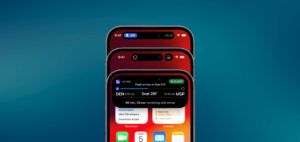
Live Activities allow real-time information to be displayed on the Lock Screen, Dynamic Island, StandBy, Apple Watch, CarPlay, and the macOS menu bar without requiring users to open the app.
New in iOS 27
Compact and minimal Dynamic Island views are now visible in landscape orientation, where horizontal space is more constrained. The new environment value isDynamicIslandLimitedInWidth makes it possible to detect this condition and adapt the UI accordingly—for example, by displaying an icon instead of text.
Data Model
The starting point is separating static and dynamic data.
- Static data is stored in a structure conforming to ActivityAttributes.
- Dynamic data is stored in a nested ContentState.
Only ContentState can be updated during the lifecycle of a Live Activity, making updates highly efficient.
Views
Views are built with WidgetKit and SwiftUI inside an ActivityConfiguration.
Four presentation formats must be considered:
- Lock Screen and StandBy – share the same view, scaled to 200%.
- Compact and Minimal Dynamic Island – display only essential information.
- Expanded Dynamic Island – provides additional space similar to the Lock Screen.
- Small Family (Watch and CarPlay) – requires explicit support through activityFamily and adapted layouts.
Using showsWidgetContainerBackground together with activityBackgroundTint enables edge-to-edge backgrounds instead of small gradients.
Updates
Live Activities can be updated in two ways:
- Directly from the app using ActivityKit while it is in the foreground.
- Through push notifications for background updates.
For events involving large numbers of users simultaneously, a broadcast channel strategy is recommended. Otherwise, individual push tokens should be used.
Interactivity
Buttons within a Live Activity are associated with an AppIntent conforming to LiveActivityIntent. When tapped, the system executes the intent directly without opening the app, enabling actions such as rating an order or confirming a task immediately.
Official video: https://developer.apple.com/videos/play/wwdc2026/223/
Conclusion
WWDC 2026 outlines a strategy centered on three major pillars: on-device artificial intelligence, platform unification, and developer tooling.
In addition to introducing Core AI and expanding access to advanced on-device models, Apple continues reinforcing the idea that iPhone, iPad, and Mac should share an increasingly common set of capabilities and APIs.
In short, the Apple ecosystem is integrating AI as a native device capability, enabling developers to create advanced experiences without relying on the cloud.